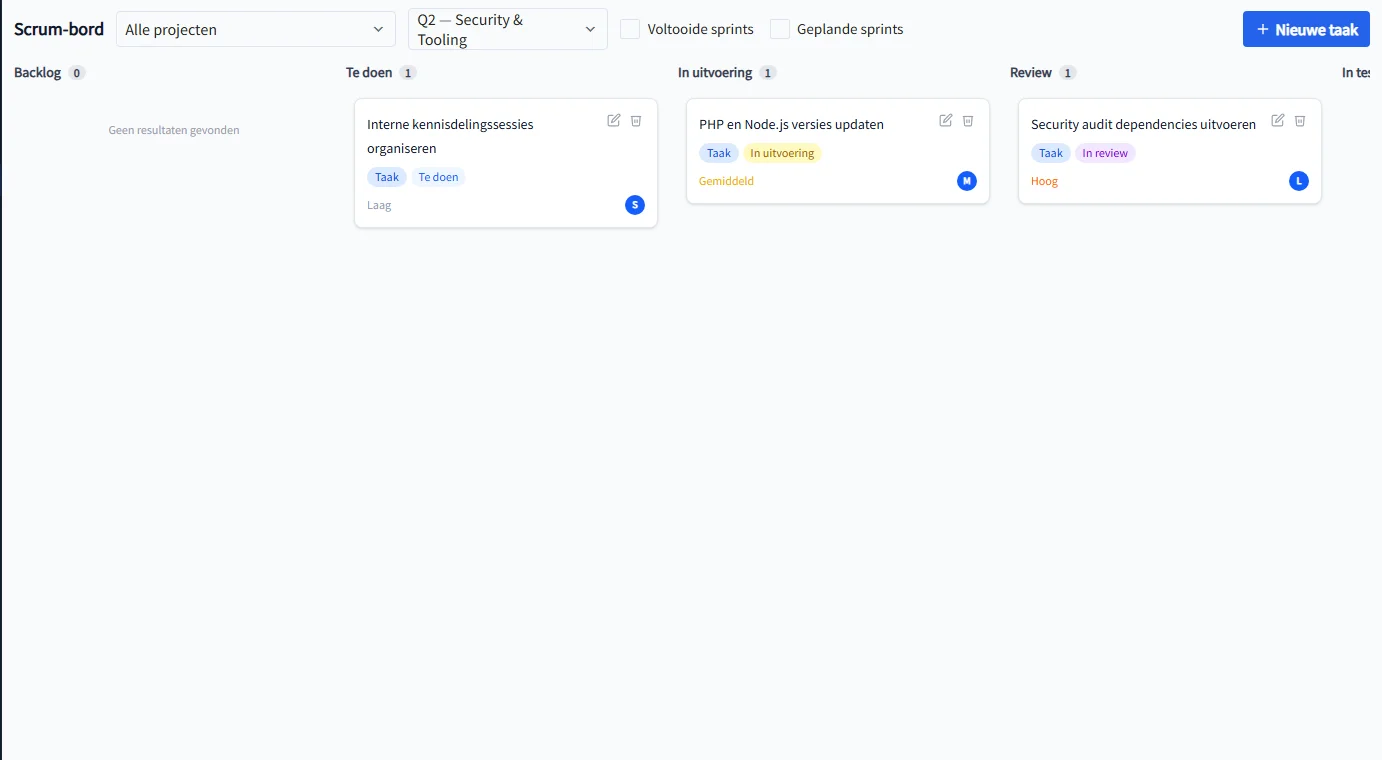
A task list is useful while the work is small. Once multiple people are working on features, bugs, and client requests at the same time, you need to see where each item stands: what is still in the backlog, what has been picked up, what is waiting for review, and what is done. The Scrum and Kanban board in PrikKlokPlus makes that workflow visual.

One board for the full workflow
The board uses columns that match the task statuses in PrikKlokPlus:
- Backlog — work that is not yet planned or does not need to be picked up yet
- To do — tasks ready for execution
- In progress — work someone is actively doing
- Review — tasks waiting to be checked
- In test — work that still needs testing or validation
- Done — completed tasks
Each task card shows the title, type, status, priority, story points, deadline, and optionally the assigned team member. That means you see not only how much work exists, but also where risk is building up.
Drag and drop: update status without opening a form
Moving a task is literally dragging it. Drag a card from To do to In progress, or from Review to In test. PrikKlokPlus saves the new status and order immediately. The board stays up to date without team members opening separate status forms.
The order within a column is saved too. Put the most important task at the top, move less urgent items down, and use the board as the team's daily priority list.
Filter by project and sprint
For teams running multiple projects at once, filtering is essential. At the top of the board you select a project or sprint. By default, PrikKlokPlus shows the active sprint so the team immediately sees what is in focus this week or period.
Planned and completed sprints can be shown separately. That keeps the daily board calm while historical work remains available when you need to look back.
Scrum or Kanban: both are possible
If you work with sprints, you use the board as a Scrum board for the active sprint. Tasks are assigned to a sprint from planning and then move through the columns until they are done.
If you prefer continuous flow without fixed sprint periods, you use the same board as a Kanban board. Filter by project, work from the backlog, and keep flow visible. You do not need to choose one method up front: PrikKlokPlus supports both ways of working.
Create new tasks directly from the board
With the New task button, you create a task without leaving the page. Choose project, sprint, type, priority, story points, start date, due date, and assigned team member. The task appears immediately in the right column.
You can also open, edit, or delete existing tasks from the board. Tasks that are already done are protected against accidental deletion.
Why this works with time tracking
The board is not a separate project management screen. Tasks are connected to projects, sprints, and time tracking. When employees log hours, they can link those hours to a task. That later helps you answer questions such as:
- Which tasks consistently take more time than estimated?
- Which sprint used the most hours?
- Which projects are getting stuck in review or testing?
- Which completed tasks are ready for invoicing?
A five-minute daily stand-up
The Scrum board is ideal for a short stand-up. Open the active sprint, move from right to left across the board, and discuss only what needs attention:
- What is in test or review and needs action?
- Which tasks are almost done?
- Which tasks have been in progress too long?
- What will the team pick up from To do today?
This keeps the meeting short and action-oriented.
How to start
- Create a project
- Create tasks in the backlog or directly from the board
- Assign tasks to a sprint if you work with sprints
- Open the Scrum board and filter by project or sprint
- Drag tasks through the columns as work progresses
